How to Build a Professional Home Video Studio
- SHARE ON:


TL;DR: Build control, not a “studio”
You don’t need Hollywood gear to look credible on camera. A professional home video studio is about consistency, clarity, and confidence, not flash. Prioritise:
- Audio first
- Lighting second
- Framing and camera placement
- Repeating a reliable setup
Build in stages, upgrade strategically, and focus on workflows that save time, not more equipment.
Why home video studios matter now (not just for calls)
For many businesses today, video isn’t just about Zoom calls. It’s a permanent channel for communicating with customers, teams, and markets. Business leaders use video for:
- Thought leadership on LinkedIn and company channels
- Product explainers and how-tos
- Webinars and on-demand training
- Sales enablement and proposals
- Client updates and internal communications
Home setups that look intentional and credible help you connect, convert, and communicate with clarity, whether live or recorded.
What “professional” actually means on camera
In business video, professional doesn’t mean cinematic. It means:
- Clear visuals: your face is well-lit and in focus
- Intelligible audio: not echoey or muffled
- Thoughtful framing: you’re positioned well on screen
- Repeatability: each video feels familiar and controlled
Audiences subconsciously register quality faster than you think, and they forgive format limitations far more than messy setups.
Consistency beats quality (for trust and performance)
A familiar visual environment builds trust. When your videos share consistent lighting, audio, and framing, your audience perceives you as reliable and authoritative. Changing locations, camera angles, and backgrounds frequently signals amateurism more than slightly imperfect lighting does.
Instead of chasing “perfect,” aim for repeatable and recognisable, because that’s what builds brand authority over time.
Choose the right space before you buy anything
A good studio starts with the space you already have. Before you invest in equipment, think about:
- Available light: Windows are great, but natural lighting changes throughout the day.
- Room depth: A background with subtle depth looks better than a flat wall.
- Echo potential: Bare rooms create harsh reflections; soft furnishings help.
- Quietness: Choose the quietest corner you can find.
If a room is too bright, too reflective, or too noisy, no amount of gear will solve it. But the best upgrades in lighting and acoustics are often inexpensive.
Audio first: The most important investment
Bad audio kills credibility faster than poor visuals. Listeners will tolerate an imperfect video image, but they won’t stick around if you sound hollow or distant.
Key principles:
- Get the mic close: A lavalier clipped near your mouth or a desktop mic a few inches away makes a huge difference.
- Control room echo: Rugs, curtains, and soft surfaces absorb reflections.
- Prioritise clarity: A budget mic with clear speech is better than an expensive setup with room echo.
Avoid onboard laptop mics; they pick up room noise and make voices sound distant. Investing in basic audio gear and treating your room acoustically pays off immediately.
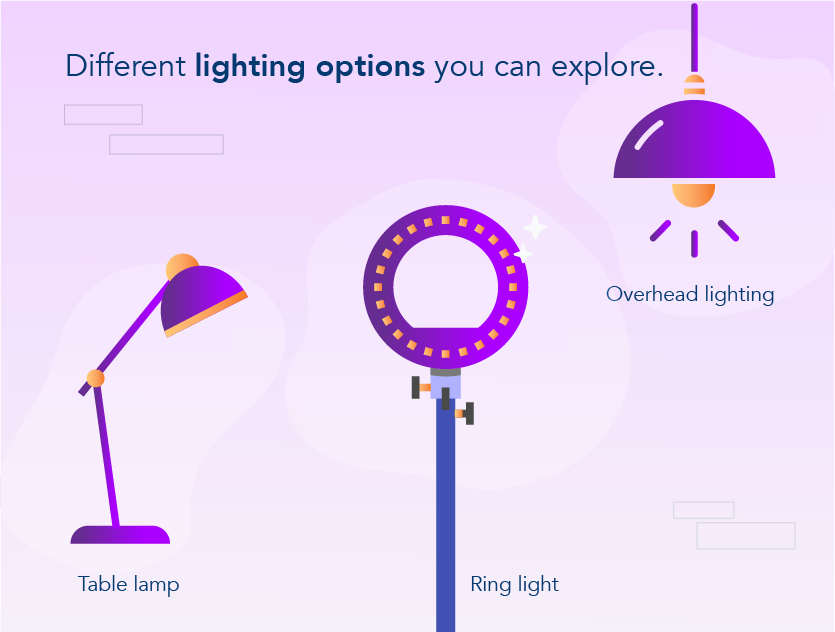
Lighting for credibility, not drama
Lighting isn’t about cinematic shadows. It’s about visibility and consistency.
Practical steps:
- Use soft, frontal lighting: A softbox or adjustable LED panel angled toward you reduces harsh shadows.
- Avoid overhead lighting: It creates dark eye sockets and unflattering shadows.
- Control natural light: If you rely on windows, use curtains to reduce inconsistency.
Good lighting makes you look alert, clear, and credible without dramatic effects that distract viewers.
Camera choices that actually matter
Your camera choice matters less than you think. Most modern smartphones and webcams are capable of professional-looking video when used well.
Options explained:
- Webcams: Great for simplicity and consistency. Look for good autofocus.
- Smartphones: Excellent sensors; shoot horizontally for most business use cases.
- Mirrorless/DSLR: Overkill unless you already own one, and they require more setup.
What matters more than the sensor is how the camera is used: steady framing, correct height, and reliable focus.
Framing for modern video (horizontal, vertical and cropped)
Different platforms need different framing. A thoughtful setup lets you repurpose content across formats.
Guidelines:
- Horizontal: Standard for LinkedIn, YouTube, and professional presentations.
- Vertical and square: Useful for Reels, Shorts, TikTok, and social snippets.
- Caption-safe framing: Leave space above and to the sides for text overlays if needed.
Frame slightly wider than tight close-ups so you can crop later without losing key visual information.
Backgrounds, depth and brand signals
Your background isn’t decoration, because it communicates professionalism.
Use tips:
- Add depth: Sitting a few feet from the background creates dimension.
- Neutral, uncluttered settings: Bookshelves, plants, or branded elements work if they’re tidy.
- Avoid green screens: They often look artificial and misread edges.
A real environment that feels intentional signals authenticity, but virtual backgrounds tend to break trust.
Eye contact, confidence and on-camera psychology
How you appear on camera affects perception as much as gear.
Boost presence with:
- Camera at eye level: You appear confident and engaged.
- Look into the lens: This translates to “eye contact” for viewers.
- Speak conversationally: Over-rehearsed scripts feel stiff; natural speech builds connection.
Confidence on camera comes from preparation and comfort with your setup, not flawless delivery.
Teleprompters, notes and speaking naturally
Reading directly from scripts can look unnatural. Instead:
- Use bullet-point notes for flow.
- Try a teleprompter app on a tablet or phone if you need fuller scripts.
- Keep key points visible near the lens to maintain eye contact.
The goal isn’t perfection; it’s authentic communication.
A simple pre-record checklist
Make every session smoother with a quick workflow checklist:
- Audio test: Is the mic clear and close?
- Lighting check: Are you evenly lit?
- Framing confirmation: Headroom and eye line correct?
- Background scan: Anything distracting?
- Notifications off: Do Not Disturb activated?
- Lens clean: Wipe the camera lens for clarity.
Consistency starts with a reliable process.
Upgrade paths: Stage 1 → Stage 3
Not all setups need to be expensive, and you can even upgrade in stages.
Beginning at Stage 1: Basic, affordable setup
- Webcam or smartphone
- Simple desk lamp + diffused light
- Basic USB mic
Stage 2: Enhanced clarity
- Dedicated LED key light
- Lavalier or desktop mic
- Framed background elements
Up till Stage 3: Full control
- Mid-range camera with fixed lens
- Multiple lights (key + fill)
- Acoustic treatment, teleprompter
Upgrade when your workflow demands it, not because the gear looks impressive.
When a home studio is enough, and when it isn’t
Home studios are powerful, but they aren’t a replacement for every project.
Great for:
- Leadership messages
- Teaching and explainers
- Consistent content calendars
Not ideal for:
- High-production commercials
- Cinematic storytelling
- Large-scale hybrid events
A hybrid model of video production, where you record at home and edit professionally, often delivers the best mix of quality and cost-effectiveness.
Advanced home video studio considerations (Once the basics are working)
Once your core setup is stable, meaning you’re enjoying clear audio, reliable lighting, and consistent framing, small refinements can dramatically improve how professional and confident your videos feel.
These upgrades aren’t mandatory, but they’re worth considering if video has become a regular part of your work.
Managing light consistency across the day
One of the most common frustrations with home studios is lighting inconsistency.
Natural light changes throughout the day, which can make videos recorded hours apart look mismatched.
To reduce this:
- Use curtains or blinds to soften daylight
- Rely more on artificial lighting than windows
- Record content in consistent time blocks when possible
Consistency matters more than “perfect” lighting.
A repeatable look builds familiarity and trust, especially if you’re publishing video regularly.
Keeping your setup camera-ready at all times
A professional home video studio works best when it doesn’t require re-building every time you record.
Simple habits help:
- Mark your chair or standing position on the floor
- Leave lights and camera mounted
- Save camera presets where possible
- Store microphones and cables neatly but visibly
Reducing friction makes video easier to start, and the easier it is, the more likely it gets used.
Recording for editing: Small choices that save hours later
Many home-recorded videos are edited later, even if lightly. Making small adjustments during recording can dramatically improve post-production results.
Record slightly longer than needed
Start recording a few seconds before you begin speaking and leave a few seconds of silence at the end. This gives editors clean audio room tones and smoother transitions.
Avoid moving mid-sentence
Shifting posture, leaning forward, or adjusting the mic mid-sentence makes cuts more noticeable. Stay relatively still while speaking, and pause between thoughts instead.
Keep visual elements static
If you’re using a background lamp, screen, or practical light, avoid turning it on or off mid-take. Consistency makes editing far easier and the final video more polished.
Audio levels and backup recording
If possible:
- Monitor audio levels before recording
- Avoid peaks that cause distortion
- Record a short test clip before longer sessions
For higher-stakes recordings, some professionals record a secondary audio track (for example, a lav mic plus a camera mic) as a backup. You may never need it, but when you do, it’s invaluable.
Home studio setups for teams (Not just individuals)
Home video studios aren’t only for solo founders or consultants. Increasingly, entire teams are recording remotely from different locations.
Establishing a shared visual standard
When multiple people appear on camera for the same brand:
- Agree on framing guidelines
- Align lighting tone (warm vs cool)
- Use similar background depth where possible
This doesn’t mean identical setups, just cohesive ones.
Providing lightweight studio guidelines
Teams benefit from a simple internal guide covering:
- Preferred camera height
- Microphone recommendations
- Lighting placement basics
- Framing examples
This avoids wildly inconsistent video quality across departments and helps non-technical team members feel more confident recording themselves.
Remote doesn’t mean unprofessional
With minimal guidance, remote recordings can look just as credible as studio footage, especially for internal comms, webinars, and thought leadership.
In many cases, audiences actually respond better to home-recorded video because it feels more human and direct.

Maintaining energy and presence on camera
Even with perfect gear, low energy can undermine a video’s impact. Camera presence is a skill and it improves with awareness and practice.
Why video feels harder than in-person speaking
On camera, you lose:
- Audience feedback
- Eye contact cues
- Natural conversational rhythm
As a result, many people unintentionally flatten their delivery.
Practical ways to improve on-camera energy
- Speak slightly more energetically than feels natural
- Use hand gestures (within frame)
- Stand instead of sitting if possible
- Record in short bursts rather than long takes
These small changes often make a noticeable difference in how engaging the final video feels.
Don’t chase “perfect takes”
Professional-looking video isn’t about flawless delivery. Slight pauses, natural breaths, and minor imperfections make speakers feel real and trustworthy.
If a take communicates clearly and confidently, it’s usually good enough.
Future-proofing your home video studio
A good home video studio should evolve with your needs, not lock you into a rigid setup.
Build flexibility into your space
- Use adjustable lights
- Choose movable stands over permanent fixtures
- Keep backgrounds modular
This allows your studio to adapt as formats, platforms, and content styles change.
Plan for repurposing
Modern business video is rarely used only once. A single recording might be:
- Published in full on LinkedIn or YouTube
- Cut into short clips
- Embedded on a website
- Used internally for training
Designing your setup with repurposing in mind increases the return on every recording session.
Final thought: A home studio is a communication tool
At its best, a home video studio fades into the background. It removes friction, builds confidence, and lets people focus on what they’re actually trying to say.
You don’t need more gear. You need clarity, consistency, and comfort. Build for those, and your videos will do their job.
Conclusion: Build for trust, not trends
Professional video shouldn’t be intimidating.
Focus on clarity, repeatability, and audience experience.
The gear you choose matters less than the message you deliver, and the confidence with which you deliver it.
Home video studios aren’t luxury; they’re infrastructure for modern communication.
FAQ
What is a home video studio?
A home video studio is a dedicated setup for recording or streaming professional-looking video from your home or office. It typically includes controlled audio, lighting, camera framing, and a consistent background designed to make business video look clear, credible, and repeatable.
How much does it cost to build a home video studio?
You can build a functional home video studio on a modest budget. Many professionals start with equipment they already own and add a basic microphone and light. Costs scale depending on how much control and consistency you need, but you don’t need high-end gear to look professional on camera.
What equipment matters most in a home video studio?
Audio matters most. Clear, echo-free sound has a bigger impact on perceived quality than camera resolution. After audio, lighting and framing make the biggest difference. Camera upgrades should come later, once the basics are working well.
Is a webcam good enough for professional video?
Yes, for most business use cases, a good webcam or smartphone camera is more than sufficient. Proper lighting, framing, and audio will improve results far more than upgrading to an expensive camera body.
Where should I set up my home video studio?
Choose a quiet space with minimal echo and some background depth if possible. Rooms with soft furnishings tend to sound better. Avoid placing yourself directly against a wall, and try to control natural light so it stays consistent throughout the day.